The Future of AI in Developers' Workflow
Published on 2/12/2026
How AI assistants, code generation, and intelligent tooling are reshaping how developers build software—and how to adapt.
Research snapshot
Read time
~3 min
Sections
6 major sections
Visuals
3 total (2 infographics)
Sources
7 cited references
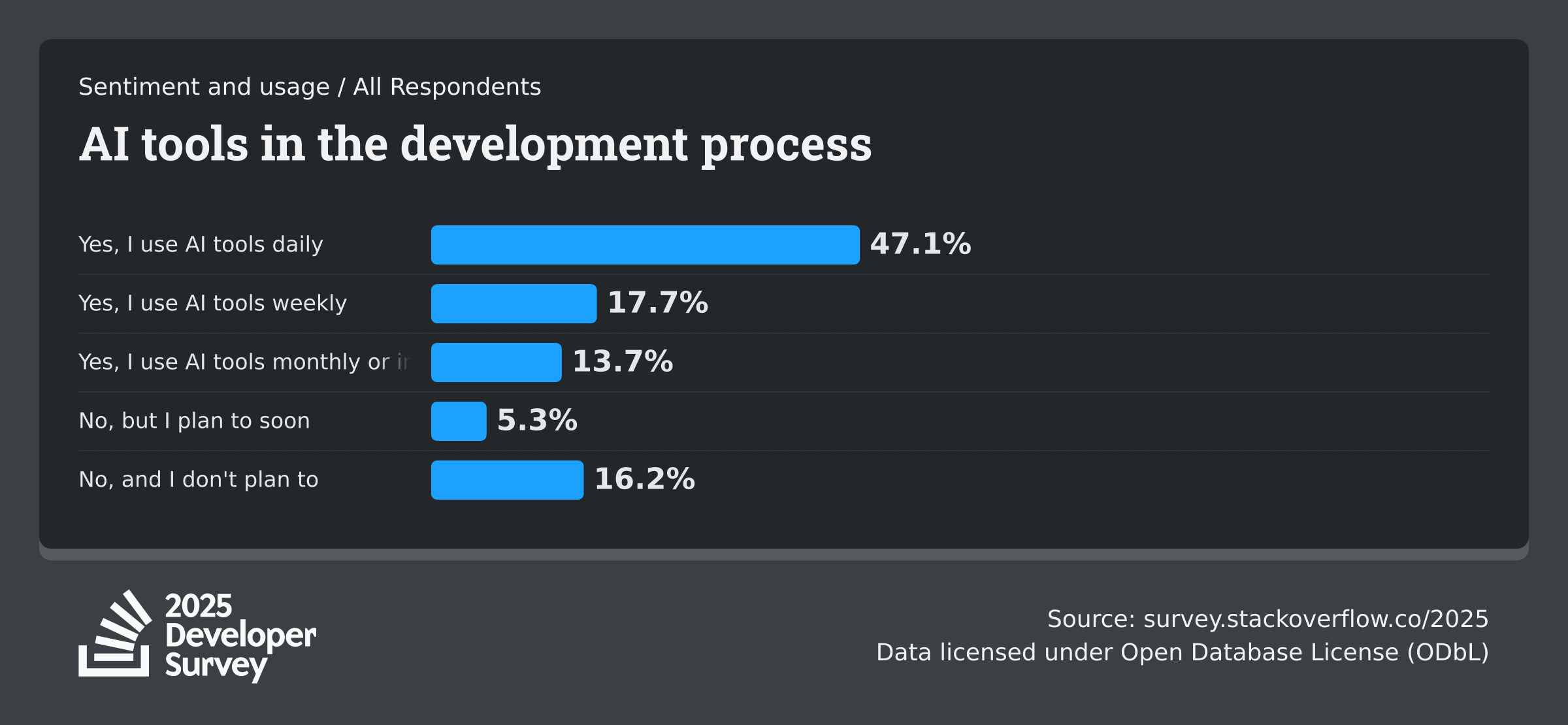
AI has shifted from experimental tooling to day-to-day infrastructure in software teams. In 2025, Stack Overflow reports 84% of developers use or plan to use AI, and JetBrains reports 85% regular AI usage across surveyed developers.
GitHub's 2025 ecosystem data also shows millions of AI-enabled projects, indicating AI-native workflows are now mainstream rather than edge behavior.
How AI is reshaping the developer workflow
AI-assisted development spans three main areas: inline completion (as you type), chat-based assistance (ask questions, generate code), and autonomous agents (multi-step tasks with minimal prompting). Tools like GitHub Copilot, Cursor, and Claude Code each emphasise different parts of this spectrum.
According to research from GitHub and MIT, developers using Copilot completed tasks 55% faster on average. The gains are largest for repetitive tasks: boilerplate, tests, documentation, and refactoring. Architecture decisions and domain logic still require human judgment—AI accelerates execution rather than replacing reasoning.
In-IDE assistants: completion, chat, and inline edits
GitHub Copilot and Cursor suggest code as you type. Copilot focuses on completion and pull request summaries; Cursor adds deep AI integration—chat, inline edits, and multi-file reasoning. Both reduce boilerplate and speed up exploration when you're learning a new codebase or API.
Our AI tools collection includes Aider, Cline, and Cody for alternative setups. Pair these with strong fundamentals—understanding algorithms, data structures, and system design—so you can validate and refine AI output.
From prompts to production: structuring requests
Natural-language prompts can generate entire features, tests, and docs.
The key is iterative refinement: start with a clear request, provide context (file paths, error messages), and refine the output until it fits your codebase and style. Vague prompts produce vague results; specific prompts with examples produce better code.
Best practices: break large requests into steps, reference existing patterns in your codebase, and always review generated code for security and correctness. AI can hallucinate APIs, introduce bugs, or miss edge cases.
Use it as a drafting assistant, not a replacement for review.
AI for code review, debugging, and documentation
AI can spot common bugs, suggest fixes, and explain unfamiliar code. Use it to augment—not replace—your own review process.
For legacy codebases, ask AI to summarise functions, identify dependencies, and suggest refactors. For debugging, paste error messages and stack traces; AI can often narrow down the cause faster.
Documentation benefits enormously: AI can generate README sections, API docs, and inline comments. Keep prompts focused—"document this function for new developers" produces more useful output than "add docs."
Staying effective: fundamentals still matter
The best developers combine AI leverage with deep expertise.
Use AI to accelerate routine work so you can focus on architecture, user experience, and domain logic. Understanding how systems work—databases, networks, concurrency—helps you catch AI mistakes and ask better questions.
Stay current: the field moves fast. Our workflow automation guide and best developer tools article cover tooling that complements AI. Explore productivity tools and AI tools in our directory.
2026 update: latest verified benchmarks
Reviewed on 2026-02-15. These benchmarks reflect the latest verified reports available as of 2026.
- 84% of developers are using or planning to use AI tools in development, and 51% of professional developers report daily usage (Stack Overflow 2025 AI).
- 85% of developers regularly use AI tools, and 62% rely on at least one AI coding assistant, editor, or agent (JetBrains Developer Ecosystem 2025).
- GitHub reports 4.3 million AI projects in 2025 and over 180 million developers on the platform (GitHub Octoverse 2025).
Use this section as the current baseline for planning and revisit the linked sources quarterly.
Next Best Step
Get one high-signal tools brief per week
Weekly decisions for builders: what changed in AI and dev tooling, what to switch to, and which tools to avoid. One email. No noise.
Protected by reCAPTCHA. Google Privacy Policy and Terms of Service apply.
Or keep reading by intent