How GitHub Enhances Collaboration for Modern Dev Teams
Published on 2/12/2026
GitHub's collaboration features for code review, project management, and team workflows—and how to use them effectively.
Research snapshot
Read time
~3 min
Sections
6 major sections
Visuals
3 total (2 infographics)
Sources
7 cited references
GitHub is more than version control: it is the operating layer for code review, planning, automation, and open collaboration. Octoverse 2025 reports GitHub passing 180 million developers, with one new developer joining roughly every second and public contribution activity still growing.
This guide covers practical workflows modern teams use to turn that platform scale into execution speed.
Pull requests and code review as the backbone
PRs are the backbone of collaborative development. Use clear descriptions: what changed, why, and how to test.
Link related issues with "Fixes #123" so they auto-close on merge. Request reviews from the right people—spread knowledge by rotating reviewers—and use draft PRs for work-in-progress to avoid premature review.
Branch protection rules enforce that PRs pass status checks (tests, lint) before merge. Require at least one approval for critical branches. GitHub's code review guide recommends reviewing in small batches and focusing on logic and security, not style (automate style with linters).
GitHub Projects and issue tracking
GitHub Projects (classic and new) let you organise issues, PRs, and milestones. Use boards for sprint planning, tables for triage, and roadmaps for release visibility. Views can filter by label, assignee, or status—customise for your workflow.
Integrations with Linear and Jira exist, but many teams stay in GitHub for simplicity. Our productivity tools collection includes Linear and task managers that pair well with GitHub. For automation, see workflow automation tools.
GitHub Actions for automation
GitHub Actions automates tests, builds, deployments, and notifications. Run tests on every PR so reviewers see green before merging. Deploy on merge to main with environment protection (e.g. require approval for production). Post release summaries to Slack or Teams.
Use composite actions and reusable workflows to reduce duplication. Secrets and environments keep credentials secure. GitHub's Actions documentation covers best practices: cache dependencies, use matrix builds for multi-version testing, and avoid long-running jobs that block merges.
Discussions, Wikis, and community
Use Discussions for Q&A, ideas, and announcements that don't fit into issues. Wikis work for docs that live with the repo—architecture decisions, runbooks, onboarding. Both keep context close to the code and searchable.
For open source, Discussions build community. For private repos, they reduce issue noise by separating "how do I...?" from "this is broken." Enable Discussions in repository settings and pin important threads.
Summary: optimise for visibility and flow
- Write clear PR descriptions and link issues
- Use Projects for visibility; customise views for your team
- Automate tests and deploys with Actions
- Use Discussions and Wikis to keep context in one place
Explore development tools and our top developer tools guide for the full stack that complements GitHub.
2026 update: latest verified benchmarks
Reviewed on 2026-02-15. These benchmarks reflect the latest verified reports available as of 2026.
- GitHub surpassed 180 million developers in 2025, with roughly one new developer joining every second (GitHub Octoverse 2025).
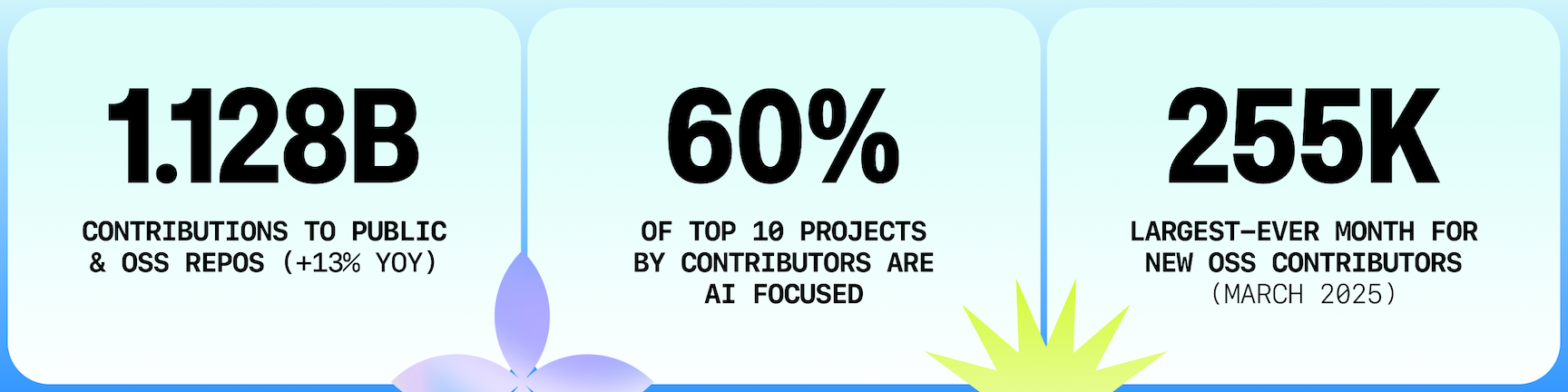
- Public and open source activity reached 1.12 billion contributions in 2025, up year over year (GitHub Octoverse 2025).
- TypeScript became the most used language on GitHub in August 2025, signaling a meaningful shift in modern production workflows (GitHub Octoverse 2025).
Use this section as the current baseline for planning and revisit the linked sources quarterly.
Next Best Step
Get one high-signal tools brief per week
Weekly decisions for builders: what changed in AI and dev tooling, what to switch to, and which tools to avoid. One email. No noise.
Protected by reCAPTCHA. Google Privacy Policy and Terms of Service apply.
Or keep reading by intent