Best AI Tools for Developers to Accelerate Coding
Published on 2/12/2026
Top AI coding assistants, code generators, and dev tools to speed up your workflow—from Copilot to Cursor and beyond.
Research snapshot
Read time
~2 min
Sections
4 major sections
Visuals
3 total (2 infographics)
Sources
7 cited references
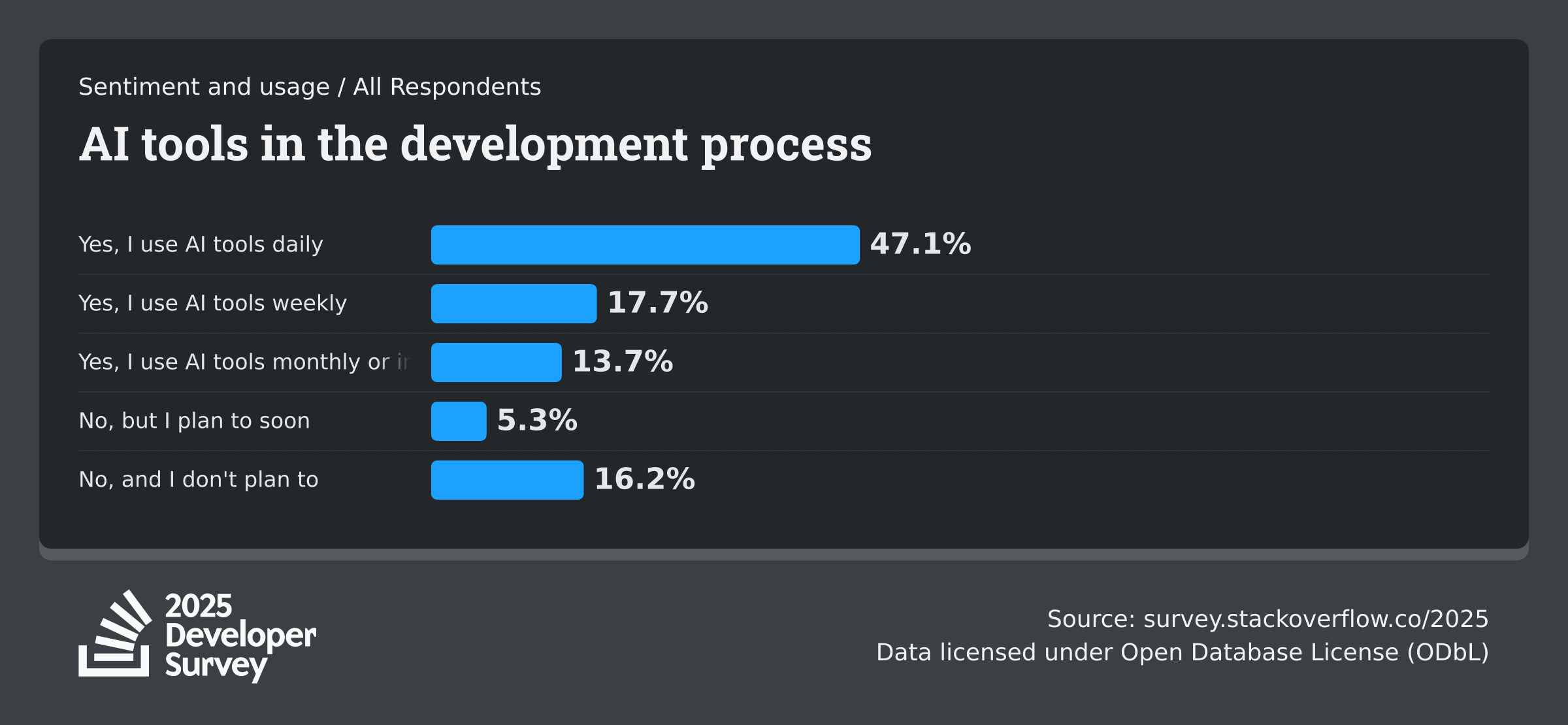
AI is now a mainstream part of development workflows. Stack Overflow's 2025 AI findings show 84% of developers use or plan to use AI tools, with 51% of professional developers using them daily.
Postman's 2025 API report also shows daily GenAI usage is now common among developers. These tools can accelerate delivery without sacrificing quality when teams keep review and testing standards high.
In-IDE assistants: Copilot, Cursor, and alternatives
GitHub Copilot and Cursor suggest code as you type. Copilot focuses on completion and integrates with GitHub. Cursor adds deep AI: chat, inline edits, multi-file reasoning, and model choice. Both reduce boilerplate and speed up exploration.
Cline (Claude in your IDE) and Aider offer terminal-based workflows. Cody by Sourcegraph brings AI to any IDE. Our AI tools collection lists Cursor, Copilot Workspaces, and Devin for autonomous coding. See the future of AI in development for the bigger picture.
Code generation, explanation, and refactoring
Ask AI to generate functions, tests, or docs from natural language. Use it to explain unfamiliar codebases or refactor legacy logic.
Always review output; AI can hallucinate or miss edge cases. Provide context: file paths, error messages, and existing patterns improve results.
For security-sensitive code, avoid pasting secrets. Use AI to draft, then validate manually. Pair with workflow automation to run tests and linters automatically after generation.
Pair AI with strong fundamentals
The best results come when you guide AI with clear prompts and domain knowledge. Use AI to accelerate, not to replace understanding. How to integrate AI APIs covers adding AI to your apps. Explore productivity tools and AI tools.
2026 update: latest verified benchmarks
Reviewed on 2026-02-15. These benchmarks reflect the latest verified reports available as of 2026.
- 84% of developers are using or planning to use AI tools in development, and 51% of professional developers report daily usage (Stack Overflow 2025 AI).
- 85% of developers regularly use AI tools, and 62% rely on at least one AI coding assistant, editor, or agent (JetBrains Developer Ecosystem 2025).
- GitHub reports 4.3 million AI projects in 2025 and over 180 million developers on the platform (GitHub Octoverse 2025).
Use this section as the current baseline for planning and revisit the linked sources quarterly.
Next Best Step
Get one high-signal tools brief per week
Weekly decisions for builders: what changed in AI and dev tooling, what to switch to, and which tools to avoid. One email. No noise.
Protected by reCAPTCHA. Google Privacy Policy and Terms of Service apply.
Or keep reading by intent